What Features Actually Matter When Choosing a Blogging Platform
Most “choosing a blogging platform” advice starts in the wrong place. It opens with a list of platform names and works backwards into features, which is exactly why so many bloggers end up migrating six months in. Start with the features your blog actually needs, and the right platform usually picks itself.
This guide works the other way round. It walks through the features worth weighing before you look at a single platform, then breaks down which types of platforms deliver on each one, including a newer option that didn’t exist the last time most “best blogging platform” lists were written: building pages yourself with an AI assistant.
The Features That Actually Matter
Before comparing platforms, get clear on what you’re actually solving for. These are the features that make or break a blogging setup once you’re a year or two in, not the ones that look good on a comparison table.
Ownership and Portability
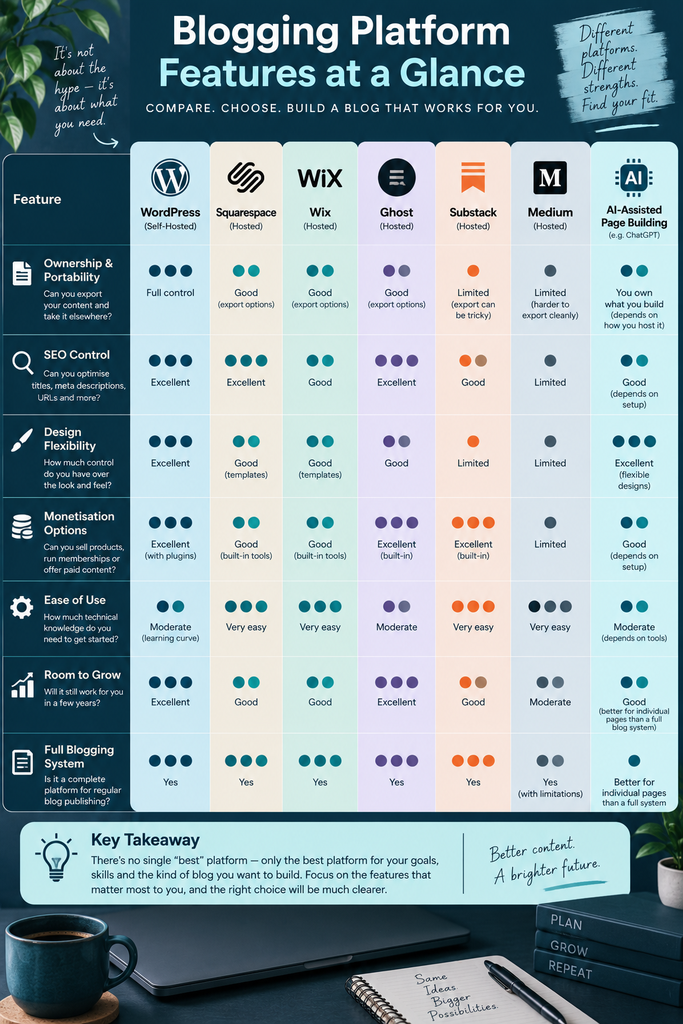
Can you export your content and take it elsewhere if the platform changes its pricing, shuts down a feature, or just stops fitting your needs? Self-hosted WordPress gives you full ownership of your files and database. Hosted platforms like Medium or Substack give you an audience but limited control over the underlying site, and exporting cleanly from them is often harder than it looks.
This matters more than it seems when you’re starting out. A blog you’ve built for two years is a genuine asset, and losing formatting, images, or your custom domain in a forced migration is a real cost, not a hypothetical one.
SEO Control
A platform’s SEO tools decide whether your posts have a chance of ranking at all. Look for editable title tags and meta descriptions, clean URL structures, and control over headings and alt text. WordPress, Squarespace, and Ghost all handle these fundamentals well; platforms built around an existing content feed, like Medium, hand you less control because the platform’s structure comes first.
Site speed is part of this too. Managed platforms tend to start ahead here because caching and image delivery are configured for you, while self-hosted WordPress can match or beat them, but only once you’ve set up caching properly and aren’t running a dozen unnecessary plugins.
Design Flexibility
Some platforms hand you a small set of polished templates and ask you to work within them. Others give you near-total control at the cost of a steeper learning curve. Squarespace and Wix sit closer to the first camp, self-hosted WordPress and Webflow closer to the second, and where you land on that spectrum should match your actual appetite for tinkering, not an idealised version of it.
Monetisation Options
If you want to sell products, run paid memberships, or build a newsletter with paid tiers, check this before you commit rather than after. Ghost was built specifically around memberships and newsletters and includes them on every plan. WordPress can do all of this too, but usually through added plugins rather than built-in tools, which means more setup and more moving parts to maintain.
Ease of Use Versus Technical Requirements
Be honest about how much time you want to spend on maintenance rather than writing. Wix, Squarespace, and WordPress.com are built to work with minimal technical input. Self-hosted WordPress and Ghost give you more power but expect you to handle updates, backups, and the occasional troubleshooting session yourself.
Room to Grow
A platform that’s perfect for ten posts a month can become limiting at a hundred. Consider where you want your blog to be in two or three years, not just where it is today. Migrating platforms later is possible, but it usually means redirect mapping, re-testing structured data, and months of settling before your search rankings fully recover, so it’s worth getting closer to right the first time.
The Main Types of Platforms to Choose Between
With those features in mind, here’s how the major categories actually stack up.
Self-Hosted CMS: WordPress.org
Self-hosted WordPress gives you full ownership and the widest possible range of plugins and themes, running on hosting you choose separately, typically from around £4 to £10 a month before you add anything else. It’s the most flexible option by a wide margin, and it’s what a lot of established bloggers eventually migrate to once they outgrow a hosted builder. The trade-off is that you’re responsible for updates, security, and backups, or you’re paying someone else to be.
Hosted All-in-One Builders: WordPress.com, Wix, Squarespace
These platforms bundle hosting, design, and publishing into one subscription, which removes most of the technical overhead. WordPress.com’s hosted plans start from around £4 to £9 a month depending on the billing term. Squarespace’s tiers run roughly £16 to £99 a month depending on the features and ecommerce tools you need, and Wix follows a similar structure with a usable free tier and paid plans building up from there.
They’re a strong fit if your blog sits alongside a bigger website, such as a portfolio or a small business site, rather than being the whole point of what you’re building.
Publishing-First Platforms: Ghost and Substack
Ghost and Substack are built around the idea that your writing is the product, not an add-on to a wider site. Ghost gives you a proper website with newsletters and paid memberships built in from its entry-level plan, typically starting around £15 a month for a hosted account. Substack goes further in one direction: it’s essentially free to start, but takes a percentage of any subscription revenue you generate, so the cost only shows up once you’re actually earning from it.
Both are worth a serious look if your long-term goal is a paid newsletter or membership community rather than a traditional blog with display ads or affiliate income.
Built-In-Audience Platforms: Medium
Medium is different from everything above because you’re not really building a website, you’re publishing into an existing platform with its own readership. That built-in audience can help new posts get discovered faster than they would on a brand-new domain. The trade-off is real: you don’t control the design, you’re subject to Medium’s own algorithm and paywall structure, and you don’t own the platform your content lives on the way you do with a self-hosted site.
AI-Assisted Page Building: A Newer Option Worth Understanding
This is the option most “best blogging platform” roundups still haven’t caught up with. Tools like Claude can generate complete, working HTML pages from a written description, and you can see and refine the result immediately before using it.
I’ve used this myself for a genuine range of page types, including a homepage and a shop page, and the workflow is fast: describe the layout and content you want, get back a working page, then ask for changes in plain English until it’s right. Anthropic’s Artifacts feature, which is what handles this, is available on every Claude.ai plan including the free tier, and finished pages can be downloaded as standalone HTML or shared directly via a link.
It’s worth being clear about what this replaces and what it doesn’t. Each generated page is essentially a single, self-contained file, so it’s genuinely strong for building individual pages such as a homepage, a shop or product page, or a landing page, and considerably weaker as a replacement for an entire multi-page blog with built-in publishing tools, comment systems, and plugin ecosystems. Think of it as a fast way to build or prototype specific pages rather than a full platform in the WordPress or Ghost sense.
I’ve only worked with Claude directly for this, but the other major AI assistants are moving in a similar direction with their own page and app-building features, so it’s worth checking what’s currently available if you’re comparing options rather than assuming any one tool has this space to itself.
Matching the Platform to Your Actual Goals
Once you know which features matter to you, the choice usually narrows fast. If you want full control and don’t mind a learning curve, self-hosted WordPress is still the strongest all-round option. If you want a polished design with almost no technical setup and your blog is part of a bigger site, Squarespace or Wix fit better.
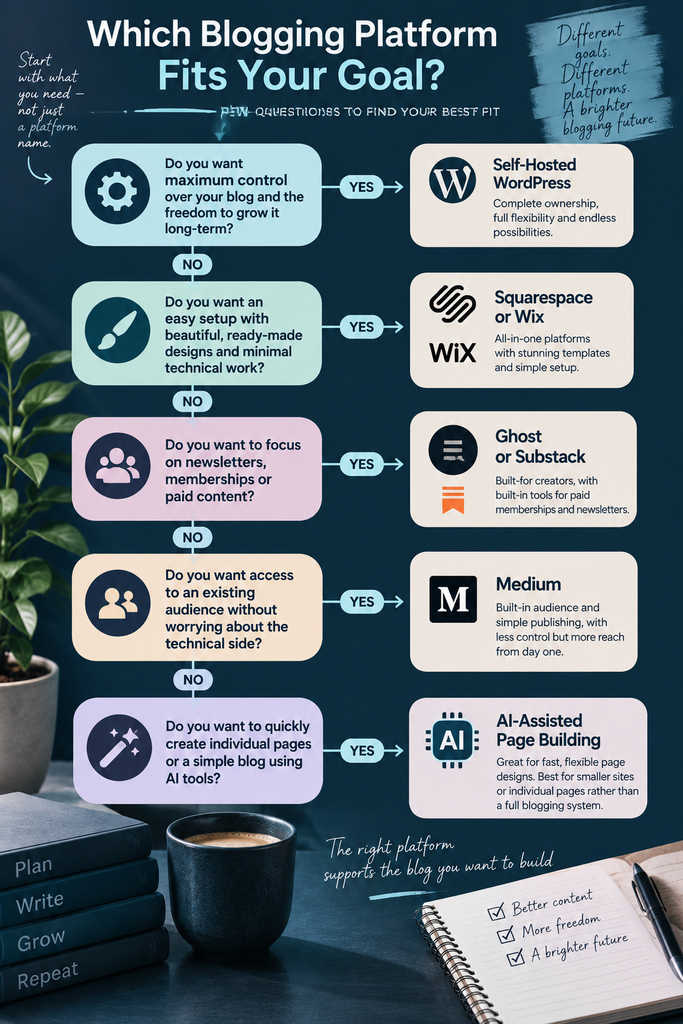
If your real goal is a paid newsletter or membership audience, Ghost or Substack are built for exactly that from day one. If you want to publish essays into an existing readership without building anything yourself, Medium can work, as long as you’re comfortable not owning the platform underneath you.
And if you need a handful of strong, specific pages built quickly, an AI-assisted tool like Claude is worth having in your toolkit alongside whichever main platform you choose, rather than instead of one.
The Bottom Line
The right blogging platform is the one that matches the features you actually need, not the one topping a generic “best of” list. Get clear on ownership, SEO control, design flexibility, monetisation, and how much maintenance you’re genuinely willing to take on, and the decision gets a lot easier to make with confidence.