

ClickUp for Bloggers: How to Organise Your Whole Content Business, Not Just the Blog
Most tool guides for bloggers assume your only job is writing blog posts. In reality, if you run a one-person content business, the blog is maybe half your week. The other half is client emails, invoicing, admin, planning, and a dozen small tasks that never make it onto any calendar because they don’t belong on a content one.
That’s the gap ClickUp fills. It isn’t built specifically for editorial workflows the way Trello’s kanban boards are, and it isn’t a relational database the way Airtable is. It’s a general-purpose workspace built to hold everything a small business needs to track, which makes it the tool worth reaching for when your organisational problem is bigger than your content pipeline.
This guide covers what ClickUp actually is, why it suits whole-business organisation better than a content-specific tool, and how to set up a workspace that keeps client work, admin, and content planning all visible without living in five different apps.
What ClickUp Actually Is
ClickUp organises everything into a hierarchy: Spaces sit at the top, each one typically representing a distinct area of your business. Inside a Space, you create Folders to group related work, and inside a Folder you create Lists, which hold the individual Tasks you’re actually working on.
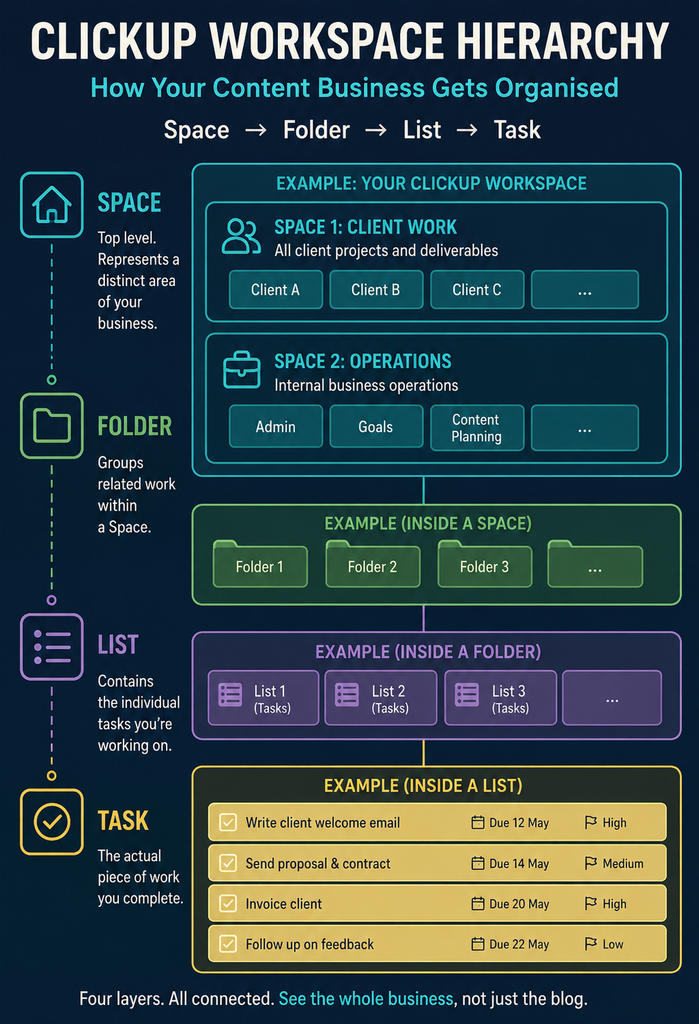
That’s four layers deep before you’ve even opened a task, which sounds like more structure than a solo operator needs. In practice, most of that depth stays empty until you need it. A simple setup might use one Space for client work with a Folder per client, and a separate Space for internal business operations with Folders for admin, goals, and content planning.
Views Are Where the Flexibility Lives
The layered structure matters less than how many ways you can look at it. A single List of tasks can be displayed as a simple list, a Trello-style kanban board, a calendar, a Gantt-style timeline, or a table, and switching between them doesn’t change the underlying data. That means the same client task list can show your assistant a kanban board while showing you a calendar of deadlines, without maintaining two separate systems.
This is the core difference from a tool like Trello, which is deliberately shallow so it stays fast to learn. ClickUp trades some of that simplicity for range. It’s less immediate on day one, but it scales to whatever a business genuinely one person is running actually needs.
Why This Suits Whole-Business Organisation Specifically
A content-specific tool solves a content-specific problem well, but a solo content business rarely runs on content alone. There’s client onboarding, invoicing chases, guest post outreach, tax admin, and the recurring task of updating old posts for SEO, none of which fits naturally into an editorial kanban board without forcing it.
ClickUp’s Spaces structure exists precisely for this. Rather than cramming client work into the same board as blog post drafts, or running three unconnected tools side by side, you get one workspace where “what needs doing today” pulls from every area of the business at once, not just the writing queue.
A Realistic Split: ClickUp for Everything That Isn’t Writing
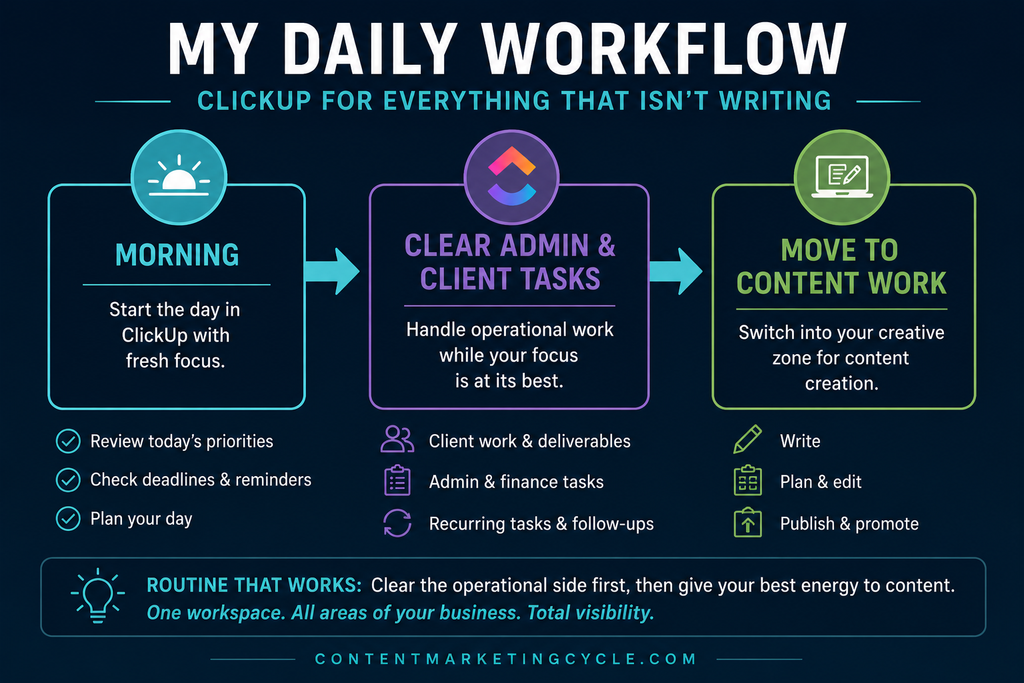
A workable pattern for a solo content business is to use ClickUp for every job that isn’t the actual writing, and something content-specific for the editorial pipeline itself. Client work, admin, and recurring business tasks live in ClickUp; the blog’s idea-to-published workflow lives wherever suits that job best, whether that’s a Trello board or ClickUp’s own board view.
The daily shape this creates is simple and worth building a routine around. Start the day in a dedicated client workspace, clearing admin and client tasks while your focus is freshest, then move into content work once the operational side is handled. Framing it this way also avoids the trap of treating ClickUp as a second, competing content calendar when it’s genuinely stronger as the layer underneath one.
Building Your Business Workspace in ClickUp
This is the section worth spending real setup time on, because the structure you choose now is what determines whether the workspace still makes sense in six months.
Structuring Your Spaces
Start with two or three Spaces that map to the real shape of your business rather than an idealised version of it. A Client Work Space with a Folder per client is the natural starting point if you take on any freelance or agency-style work alongside your own content. A separate Space for internal operations, covering admin, finance, and business goals, keeps that entirely distinct from anything client-facing.
Resist the urge to build every Space you might eventually need. An empty Folder for “future business ideas” adds clutter without adding organisation, and it’s far easier to add a Space later than to untangle one that’s grown unwieldy from being set up too ambitiously on day one.
Setting Up Recurring Task Reminders
One of ClickUp’s genuinely useful features for a content business is recurring tasks, which solve a problem most bloggers handle badly: remembering to update old posts. A recurring task tied to a specific post, set to fire every six or twelve months depending on how fast that topic dates, means content maintenance happens on a schedule rather than whenever you happen to notice a post has gone stale.
This works particularly well layered on top of a content database if you’re already using one. A recurring ClickUp task that says “review and update [post title]” does the reminding, while the actual performance data that tells you whether it’s worth updating can live in a connected system elsewhere.
Docs and Goals: Keeping the Operational Layer Close
ClickUp Docs sit inside the same workspace as your tasks, which matters more than it sounds. Standard operating procedures, client onboarding checklists, and brand guidelines can live directly next to the tasks that reference them, rather than in a separate Google Drive folder you have to remember exists.
Goals work similarly as a lightweight way to track business-level targets, whether that’s a revenue figure, a number of client projects, or a content output target, without needing separate analytics software. For a solo operator, the value isn’t the reporting depth so much as having one place that shows both the daily tasks and the reason you’re doing them.
Where ClickUp Reaches Its Limits
ClickUp is genuinely broad, but broad isn’t the same as best-in-class for every use case sitting inside it. Its kanban board view works, but it’s a feature bolted onto a bigger tool rather than the whole point of the product, and a dedicated editorial calendar board in something built specifically for that job will usually feel faster to use day to day.
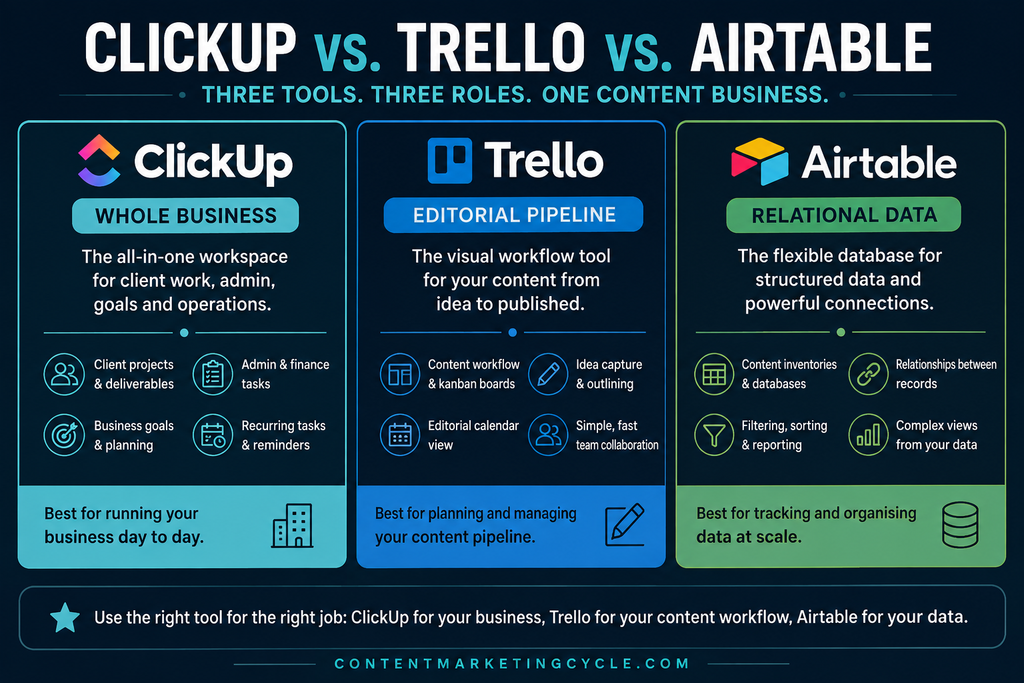
The honest advice for a solo content business is to let ClickUp own the parts of the operation that are genuinely varied and cross-functional, client work, admin, goals, recurring reminders, and lean on a purpose-built tool for the parts that aren’t. If Trello’s kanban structure already has your editorial pipeline covered, there’s no need to rebuild it inside ClickUp just because the option exists there too.
Getting Started on the Free Plan
ClickUp’s Free Forever plan is a genuinely usable starting point for a solo content business, not a stripped-down trial. It includes unlimited tasks and unlimited members at no cost, along with kanban boards, calendar view, and basic custom fields, though it caps you at 60MB of shared storage and five Spaces.
For most solo operators, five Spaces is enough to structure client work, admin, and content planning without hitting the ceiling. Storage is the more likely constraint if you’re attaching a lot of files directly to tasks, in which case the Unlimited plan removes that cap for around £6 to £8 a month per user depending on the exchange rate at the time, billed annually.
It’s worth checking current pricing directly on ClickUp’s site before committing, since plan names and inclusions shift more often than most software. What’s held steady is the underlying value proposition: a workspace flexible enough to hold client work, admin, and business goals in one place, at a price point that doesn’t punish a business for being small.
Templates and a Quick Start
ClickUp’s own template library includes pre-built setups for freelancers, content creators, and small agencies, and starting from one of these is faster than building a workspace from a blank Space. Search directly from the “Add Space” or “Add Folder” screen for terms like “freelancer” or “content creator” to see the options built closest to a solo content business’s actual needs.
Treat any template the same way as a Trello one: as a skeleton to trim down, not a finished system to adopt wholesale. The Folders and Lists that came pre-built for a hypothetical five-person agency are rarely the ones a one-person operation will actually use, and the workspace only becomes genuinely useful once it reflects how you really work rather than how a template assumed you would.
Bringing It Together
The case for ClickUp isn’t that it beats every specialised tool at its own game. It’s that a solo content business has more moving parts than content alone, and having one workspace that holds client work, admin, and business goals alongside your editorial planning removes the daily friction of switching between disconnected systems just to see what needs doing.
Start with two Spaces, one for anything client-facing and one for internal operations, and resist building out the rest until you can see where the gaps actually are. A workspace that grows to match real needs will always serve a solo operator better than one built to anticipate every possibility on day one.
Continue Your Journey
- How to Use Trello for Blogging — for building the editorial calendar side of your content pipeline specifically
- Using Airtable for Blogging — for tracking ideas, income, and performance data in one connected system
- Tools & Productivity — more software breakdowns built specifically for solo content creators
- Content Strategy — planning frameworks for deciding what to write before it hits any board
What does your current business admin setup look like, one tool for everything or a patchwork of a few? I’d love to hear what’s working, or not, for you in the comments.
Want guides like this delivered straight to your inbox as we publish them? Subscribe to the Content Marketing Cycle newsletter for practical tool breakdowns and blogging strategy, minus the fluff.

