
Using Airtable for Blogging: The Only Guide You Need to Organise Your Content Business
If you’ve spent any time in blogging or content creator circles, you’ve probably heard someone rave about Airtable. It gets pitched as a spreadsheet, a database, a project manager, and a content calendar all at once, which honestly makes it sound more complicated than it needs to be. Once you understand the handful of building blocks underneath it, Airtable becomes one of the simplest ways to bring order to the chaos of running a one-person content business.
This guide walks through what Airtable actually is, how to get a base up and running in minutes, and the specific ways bloggers and solopreneurs use it day to day — from managing a content idea backlog to tracking Pinterest performance and affiliate income. We’ll also cover something that didn’t exist when most Airtable tutorials were written: how tools like Claude and ChatGPT can now connect directly to your bases, meaning you can update and query your content system just by chatting with an AI rather than clicking through menus.
What Is Airtable, Really?
The easiest way to think about Airtable is as a spreadsheet that learned some database tricks. It looks familiar enough that anyone who has used Excel or Google Sheets will feel at home within a few minutes, but underneath it has a structure that makes it far more flexible for organising content work.
Everything in Airtable is built from five components. A base is the top-level container — think of it as the whole notebook rather than a single page. Inside a base, you create tables, which function like the individual sheets or tabs, each one dedicated to a single type of thing, such as blog posts, Pinterest pins, or affiliate programmes.
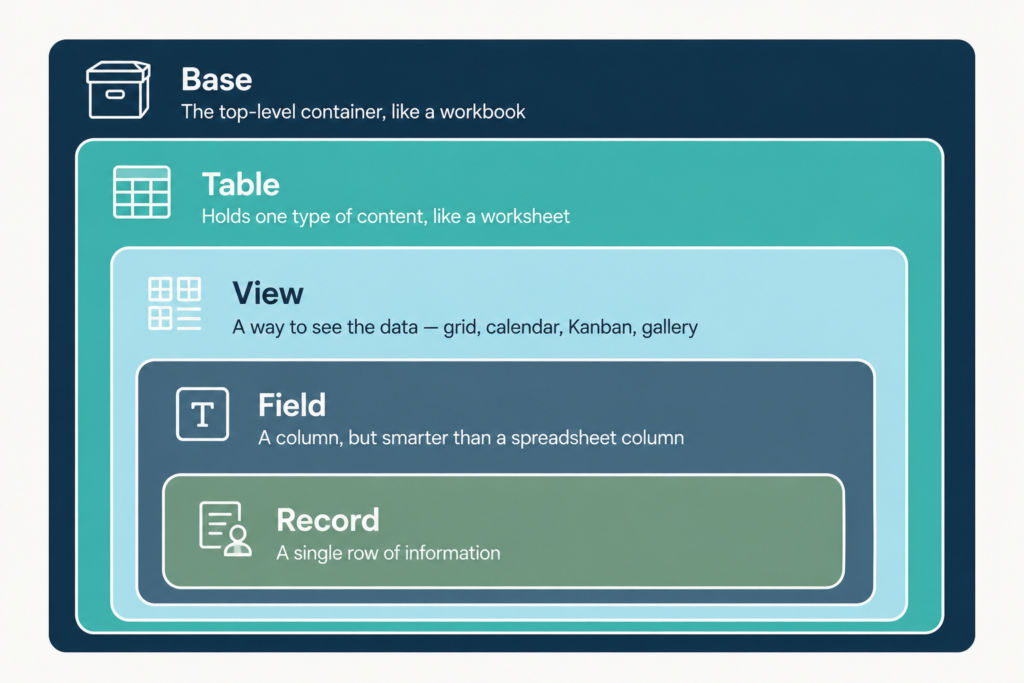
Within each table, fields are the columns, and this is where Airtable pulls ahead of a normal spreadsheet. Instead of just plain text, a field can be a dropdown with colour-coded options, a date picker, a currency value that totals automatically, an attachment slot for images, or a link that connects to a record in a different table entirely. Each individual row is a record, and how you look at your records is controlled by views — a simple grid, a calendar, a Kanban board, or a gallery of images, all pulling from the same underlying data.
Getting Your First Base Started
You don’t need to build a base from nothing to get going. Airtable gives you four realistic starting points, and which one makes sense depends entirely on what you’re bringing into the system.
Starting from scratch works well when you know exactly what fields you want and would rather build deliberately than adapt something pre-made. If you already track content ideas or expenses in a spreadsheet, you can import that CSV directly and Airtable will recreate it as a table, defaulting every column to plain text until you go back and assign proper field types. Once you have a base you like, duplicating it is the fastest way to spin up a second version for a different niche or client without redoing the setup work.
The fourth option, and the one worth exploring first if you’re newer to Airtable, is templates. Airtable maintains a large library covering everything from editorial calendars to social media trackers, and because they’re fully editable, they work more like a head start than a rigid mould. You can strip out fields you don’t need and add your own without breaking anything.
Inside the toolkit
Free Airtable template
Get the Blogger’s Airtable Toolkit
A ready-to-duplicate base with five connected tables for planning, tracking, and growing your blog. Drop your email in and I’ll send the link straight over.
The Field Types Worth Knowing
A handful of field types come up again and again in a blogging-focused base, and knowing what each one is for will save you from defaulting everything to plain text. Single line text handles short entries like a post title, while long text is better suited to notes or outlines that need line breaks. Date fields are essential for anything tied to a publish schedule, and a URL field automatically turns entries into clickable links.
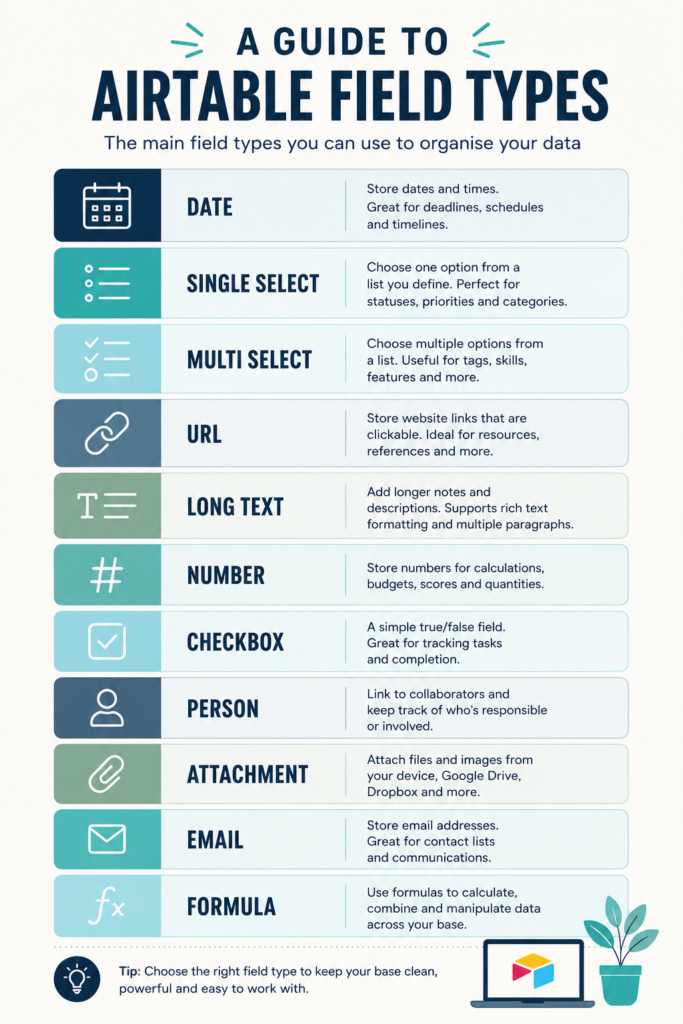
Currency fields will total themselves at the bottom of a column, which is genuinely useful for tracking affiliate payouts or ad revenue without touching a calculator. Single select and multiple select fields let you build colour-coded status systems — draft, in progress, published — while a checkbox is often the simplest way to mark something done. Attachment fields let you drop in a featured image or a PDF brief directly onto a record, and linked record fields let one table reference another, which is how you connect, say, a blog post to the Pinterest pins created for it.
Building a Content Idea Backlog
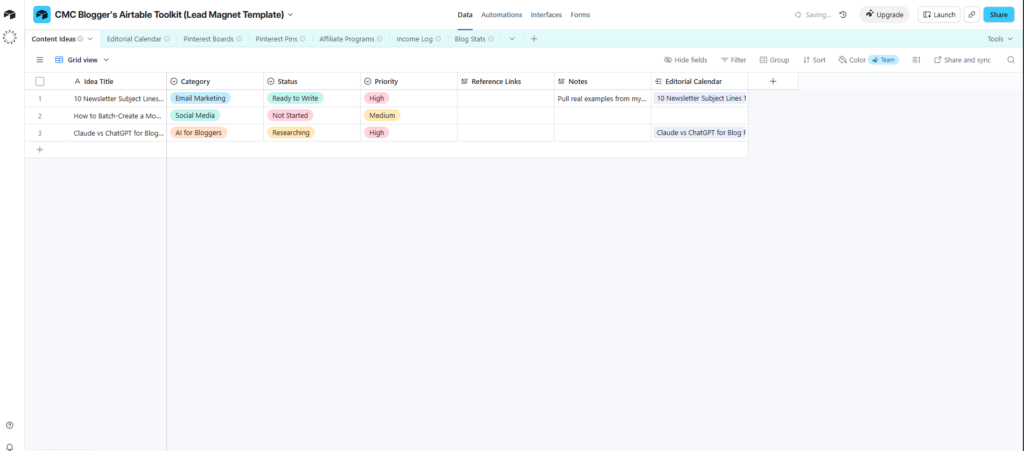
Every blogger has ideas scattered across notes apps, bookmarked tweets, and half-finished drafts. A dedicated ideas base in Airtable solves this by giving every spark of an idea one permanent home, tagged with a topic, a status, and any reference links you’ve collected for it.
The real value shows up when it’s time to actually write. Rather than hunting back through old notes, you open the record for that idea, pull whatever links and research you’d already saved, and move straight into drafting. Pairing this backlog with whatever tool you use for your actual editorial calendar means ideas never sit forgotten — they graduate naturally from “someday” to “scheduled.”
Running Your Editorial Calendar Through Airtable
A content calendar is really just a specialised view of the same base structure — records for each planned post, with fields for the publish date, status, target keyword, and word count. What makes Airtable stronger than a plain calendar app is that you can flip between views of the exact same data without duplicating anything.
The grid view works well for planning and bulk editing, letting you scan every post at once and update several statuses in a row. Switch to calendar view and the same records appear laid out across the month, which is far easier for spotting gaps or a week that’s suddenly overloaded. A Kanban-style view sorted by status — idea, drafting, editing, scheduled, published — gives you an at-a-glance sense of where everything sits in the pipeline, which matters even when you’re the only person moving cards.
Before any of this becomes useful, it helps to think through the plan behind it: what topics you’re covering, how often you’re realistically publishing, and what a completed post needs before it counts as ready. Once that’s settled, reviewing performance after publishing — what ranked, what got shared, what’s worth updating — closes the loop and feeds directly back into your next batch of ideas.
Tracking Pinterest and Social Media Performance
Pinterest rewards consistency and strategy more than almost any other platform bloggers use, and Airtable is a genuinely good fit for tracking both. A base for your boards lets you log when each one was last audited, its keyword focus, and whether it’s still earning its place in your strategy — useful the next time you’re deciding what to prune.
A second table can track individual pins against the posts they promote, including which board they went to and how they performed once live. If you’re repurposing content across multiple pins or testing different pin designs for the same post, linking those pin records back to the original blog post record keeps everything traceable instead of scattered across screenshots and spreadsheets.
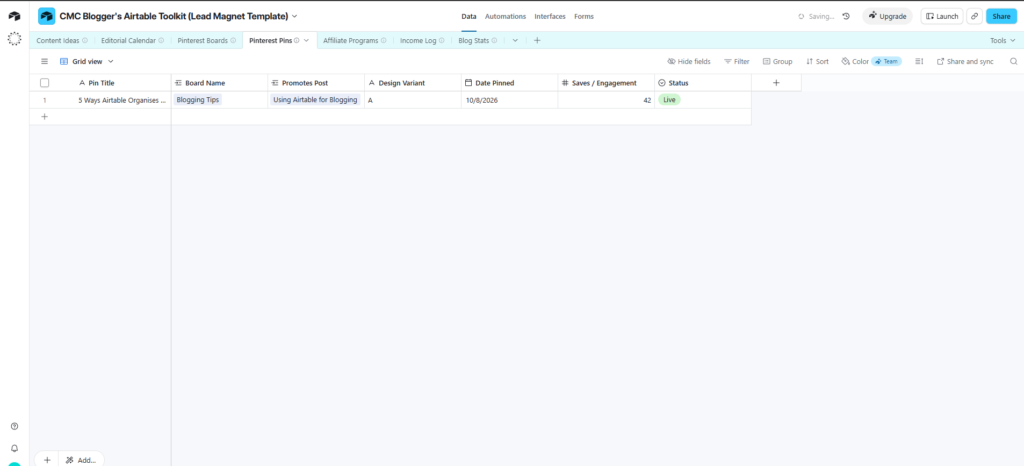
The same structure extends to any platform you’re active on. Fields for engagement rate, reach, and post type let you compare what’s actually working rather than relying on gut feeling, and a multi-select field for content themes makes it easy to spot which topics consistently perform best for your audience.
Managing Affiliate Programmes and Income
Most bloggers end up juggling more affiliate programmes than they can comfortably remember, each with its own cookie length, payout schedule, and dashboard login. A dedicated Airtable base turns that scattered knowledge into one searchable list, with fields for the programme name, the network it runs through, your affiliate link, commission structure, and payout terms.
Pairing this with an income tracking table — weekly or monthly entries broken down by source, whether that’s affiliate income, sponsored posts, ad revenue, or product sales — gives you a real picture of where your money actually comes from. Because currency fields total automatically, you get a running sum without any extra formula work, and a yearly summary table can pull those monthly totals together for a much clearer view of how the business is trending.
Tracking Blog Statistics Over Time
However you feel about spreadsheets, there’s real value in recording your traffic and performance numbers somewhere more permanent than a screenshot folder. A weekly stats table with fields for pageviews, top posts, and traffic sources builds a dataset you can actually look back on, and a monthly rollup makes it easy to compare how one month stacked up against the last several without digging through your analytics platform’s own limited date ranges.
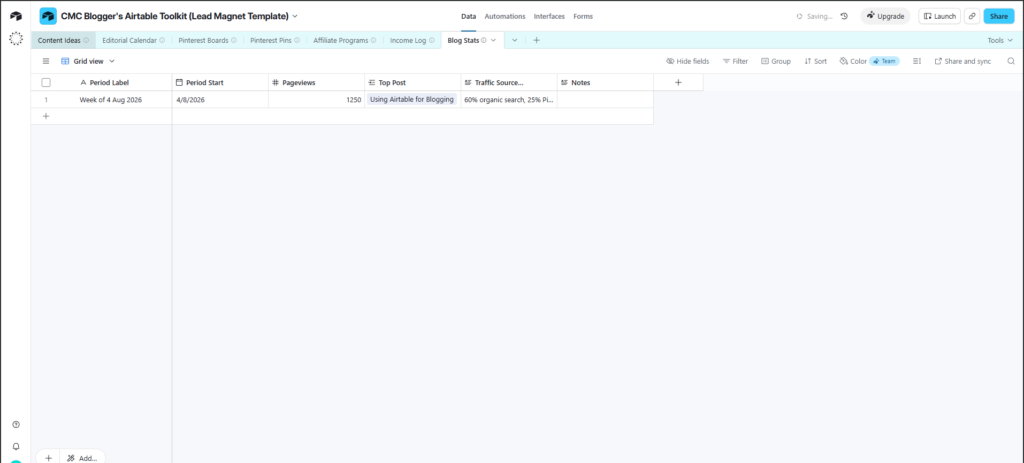
Over a year, that habit turns into something genuinely valuable: a clear record of what moved the needle, when growth accelerated, and which changes to your content or promotion strategy actually correlated with results.
Using Claude and ChatGPT With Your Airtable Bases
Everything above describes using Airtable through its own interface, which is still the most common way most bloggers interact with it. But one of the more significant changes to hit Airtable recently is that you no longer have to open the app at all to work with your data — both Claude and ChatGPT can now connect directly to your bases.
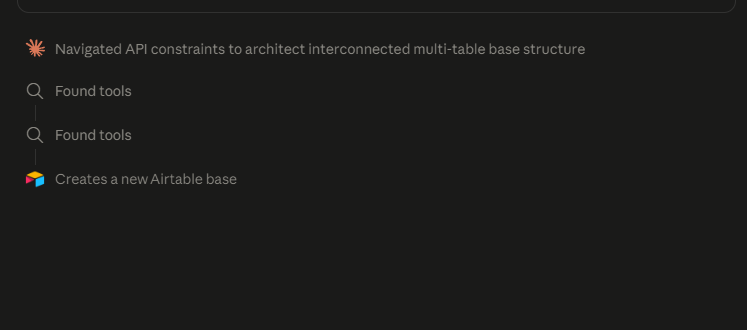
Claude connects to Airtable through what’s called an MCP connector, which is essentially a secure link between Claude and your Airtable account. Once it’s connected, you can ask Claude in plain language to look something up, add new records, update existing ones, or even build out a brand new base and its tables from scratch, all without leaving the conversation. For a blogger, that might mean asking Claude to pull every idea tagged “not started” from your backlog and turn them into a first-draft outline, or having it log a batch of new affiliate programmes into your tracker after you paste in the details from an email.
ChatGPT gained similar functionality when Airtable shipped a native app for it in December 2025, letting users query and update their bases directly inside a ChatGPT conversation. In practice, this means you can ask either assistant something like “what posts are still in drafting status for this month” or “add this new pin to my Pinterest tracker” and have it read from or write to your actual Airtable base in response, rather than you needing to open Airtable and do it by hand.
This matters more than it might sound like at first. The tedious part of running a content system was never deciding what belonged in it — it was the manual data entry and lookup required to keep it updated. Handing that off to an AI assistant that can actually reach into your base doesn’t replace the system you’ve built; it just removes the friction of maintaining it.
Choosing the Right Airtable Plan
For most solo bloggers, Airtable’s free plan is genuinely enough to run everything covered in this guide. It currently supports up to five editors and 1,000 records per base with 1GB of attachment storage, which comfortably covers a content backlog, an editorial calendar, and a handful of tracking bases for one person.
If you eventually bring on a virtual assistant, co-writer, or team, or you find yourself bumping against the record limit across a growing number of bases, the paid Team plan adds higher record ceilings and more advanced views like Gantt and timeline layouts. Airtable’s pricing and limits shift periodically, so it’s worth checking their current plans page before assuming last year’s numbers still apply — but for a single content creator just getting a system in place, there’s rarely a reason to pay before you need to.
Bringing It All Together
The real strength of Airtable for bloggers isn’t any single base or table — it’s that your content ideas, your editorial calendar, your Pinterest performance, your affiliate income, and your traffic stats can all live in one connected system instead of five disconnected tools. Start small. A single ideas table and a basic content calendar are enough to feel the difference, and you can layer in Pinterest tracking, affiliate management, and stats over time as the habit sticks.
And now that Claude and ChatGPT can reach directly into your bases, keeping that system updated is easier than it’s ever been. The organisation used to be the hard part. That part just got a lot lighter.
What’s the first base you’re going to build — an ideas backlog, a content calendar, or something else entirely? Drop it in the comments, I’d love to know where you’re starting.
Inside the toolkit
Free Airtable template
Get the Blogger’s Airtable Toolkit
A ready-to-duplicate base with five connected tables for planning, tracking, and growing your blog. Drop your email in and I’ll send the link straight over.

